EOOEIES
- 4.6
- Rating
- 50.00K
- Installs
- Free
- Price

 Analysis by App-foxy
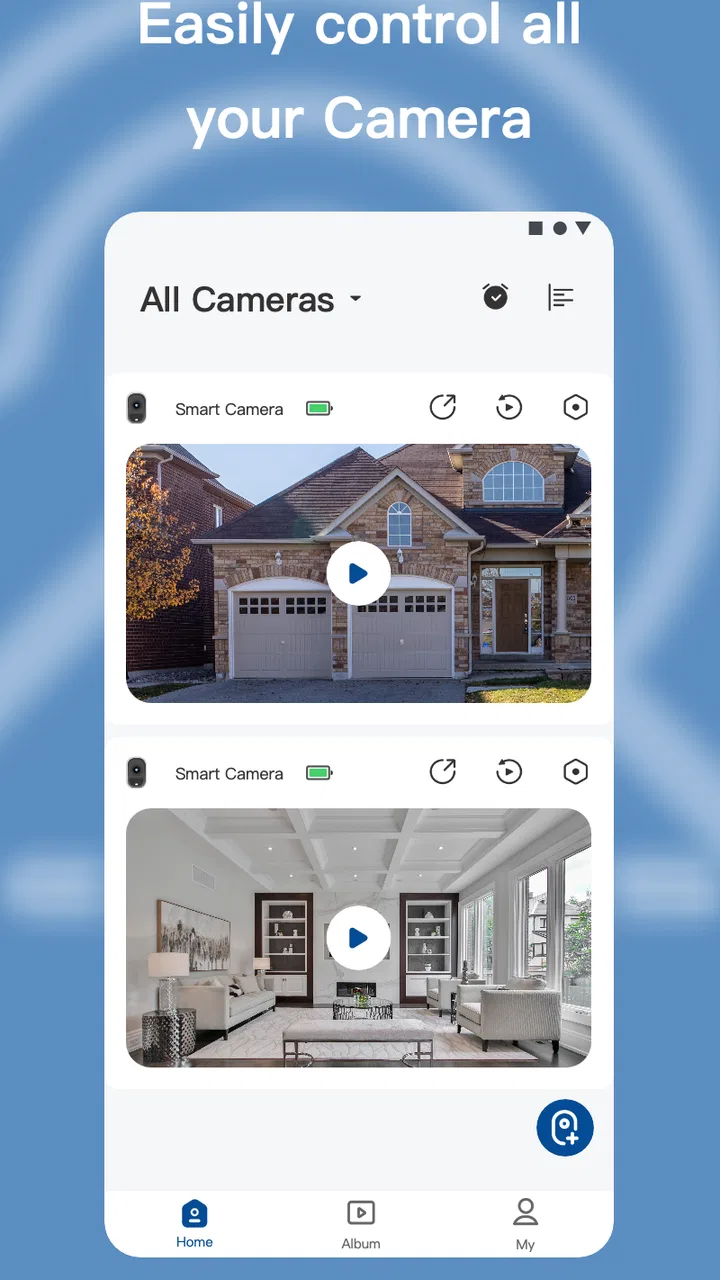
When I look at a home-security camera app, I care about more than whether I can see a live picture. A camera is part of a private space, so the useful question is whether the app gives me clear control over access, notifications, and the moments when I actually want to check in. EOOEIES is a free tools app from EOOEIES that connects its security cameras with a smartphone, and I found its appeal easy to understand: it puts camera monitoring in the same device I already carry around.
That convenience matters in ordinary situations. I might be away from home and want to check whether a delivery has arrived, confirm that a family member got back safely, or take a quick look at a room before turning in for the night. A dedicated monitor can show a camera continuously, but a phone is more flexible. I do not need to stay in one place, and I can check the camera while moving through the rest of my day.
My overall impression is cautious but positive. The app has a 4.6 average from around 1.2 thousand ratings, which suggests that many people find the basic camera-monitoring experience useful. It has passed 50 thousand installs, so it is not an obscure experiment with no visible audience. Still, a good rating is not a substitute for checking how an app handles sensitive access. With a security camera, I would make privacy and account habits part of the setup rather than treating them as afterthoughts.
You May Also Like

 Pandora - Music & Podcasts
Pandora’s Music Is Easy to Start, but Harder to Recover
Pandora’s strength is its low-effort path from a seed to a station. Its weak spot is how much confidence it asks you to place in connection, setup, and quiet recovery.

 8 Ball Pool
 Is Built on Rivalries, Rematches, and Routine
A close look at the rivalries, rematches, shared routines, and unanswered safety questions that turn a quick pool match into a persistent mobile community.

 Samsung Music
’s Quiet Strength Is Playing What You Already Own
Its reach comes less from spectacle than from dependable access to a personal library. That simplicity is both the app’s strongest retention engine and its ceiling.

 AccuWeather: Weather Radar
AccuWeather Review: A Quick, Clear Forecast for Everyday Decisions
For everyday plans, the best forecast is the one you can understand quickly. AccuWeather makes rain timing, radar, and local conditions easy to act on, with a few trade-offs.

 Hill Climb Racing
Why Hill Climb Racing Still Turns Crashes Into One More Run
A tiny car, a bumpy hill and one more upgrade: Hill Climb Racing keeps resurfacing because its simple chaos makes every near-miss feel personal.

 AliExpress - Shopping App
AliExpress Makes Global Shopping Feel Personal, but Shoppers Bear the Risk
AliExpress turns a global marketplace into a pocket-sized discovery engine. Its reach is useful, its shopping loop compelling, and its trade-offs easy to miss.
More From Our News Desk
View All News


What EOOEIES is really useful for
EOOEIES is best understood as a companion for compatible EOOEIES security cameras, not as a general-purpose home-control platform. Its central job is to let a phone act as the viewing point for the camera. That makes it suitable for people who want occasional remote awareness rather than a complicated surveillance workstation.
The most practical use is a short check rather than constant observation. A parent could look in on a sleeping child without walking into the room. Someone caring for an older relative could use the camera connection as one part of a wider routine. A pet owner could check a familiar area during a long day away. In each example, the value comes from reducing uncertainty quickly, not from replacing direct care or an emergency service.
I would also use it for a simple arrival-and-departure routine. Before leaving, I could make sure the camera is pointed at the intended area and that the phone can reach it. After arriving elsewhere, I could check the same view once rather than repeatedly opening the app. That small discipline is helpful because frequent, unplanned checking can become distracting, especially when a camera is watching a busy part of the home.
The app is free to install, which lowers the barrier for someone who already owns the matching camera equipment. It also carries an Everyone age rating, making the software broadly accessible from a content-classification perspective. That rating should not be confused with a recommendation to give every household member unrestricted camera access. The sensitive part is not the age label; it is who can view a private space and when.
Getting started without creating unnecessary exposure
I would begin setup with the camera in the room where it will actually be used, rather than pairing it casually on a kitchen counter and forgetting where the lens is aimed. The first useful test is not just whether an image appears. I would check whether the view includes a doorway, neighboring property, or an area that should remain private. A technically successful connection can still produce an unsuitable camera angle.
Next, I would test the connection from the place where I expect to use it. A camera that works beside the home network may behave differently from a phone used away from home. I would also close and reopen the app, lock the phone, and return to the camera view. These small checks reveal whether the everyday workflow feels dependable enough for a quick safety check.
I would avoid sharing the phone casually during this stage. If another person needs access, I would first look for the app’s visible account or sharing controls and use those rather than handing over my unlocked device. I would not assume that a second viewer has the same authority as the main account. The safest habit is to grant only the access that is clearly needed and remove it when the arrangement ends.
Because the current version is 1.0.4 and the app supports Android 7.0 or later, compatibility is reasonably broad for older Android phones. Even so, operating-system support does not guarantee that every camera or phone model will behave identically. I would keep the phone’s system software current where possible and test the actual combination before relying on it for an important routine.
The controls I would inspect before trusting it
With a camera app, visible controls matter more to me than a long feature list. I would look for clear ways to sign in, sign out, change account details, and review any connected devices or shared users. I would also check whether the app distinguishes between viewing a camera and changing its settings. That separation is valuable: a person who only needs to look at a feed should not automatically be able to alter the camera’s configuration.
I would pay attention to the phone’s permission prompts as well. I would grant only permissions that make sense for the action I am trying to perform. If a feature needs notifications, I would decide whether alerts are useful enough to justify the interruption. If a permission appears unrelated to viewing or managing the camera, I would pause and investigate the explanation shown by the operating system before accepting it.
Notifications deserve a particularly careful look. A lock-screen alert can reveal that motion was detected or that a camera event occurred, even when the phone is in someone else’s hands. I would choose a lock-screen display that does not expose more detail than necessary, and I would avoid enabling every alert simply because the option exists. A quiet, meaningful alert is easier to act on than a stream of low-value interruptions.
I would also inspect the app’s account controls after the initial setup, not only when something goes wrong. The useful questions are practical: Can I sign out quickly? Can I recognize the account currently in use? Can I remove an old phone? Can I change credentials without hunting through unrelated menus? If these actions are easy to find, I feel more confident that I can respond when a phone is lost or a household arrangement changes.
Where privacy decisions become important
The most sensitive moment is not opening the live view; it is deciding who can open it later. A camera inside a home can show routines, faces, visitors, and empty rooms. I would therefore treat the account like a key. I would use a strong, unique password and avoid saving access on a device that other people regularly use. If the app presents additional account-protection choices, I would enable the ones I understand and can maintain.
I would also think carefully about placement. A camera aimed at a front entrance has a different privacy profile from one aimed at a bedroom, bathroom corridor, or shared workspace. EOOEIES can make a compatible camera viewable from a phone, but that convenience does not decide where the lens should point. My rule would be to cover the area that needs monitoring while excluding spaces where people reasonably expect privacy.
There is a subtle trade-off between convenience and discretion when the phone is shared. Staying signed in makes quick checks easier, but it also leaves the camera closer to anyone who can unlock the phone. Signing out adds friction, yet that friction may be worthwhile for a guest device, a work phone, or a phone used by children. I would choose based on the people who can physically reach the device, not just on how often I use the app.
I would be equally careful with screenshots and recordings made outside the app. A private camera view can become less private once it is copied into a photo gallery or sent through a messaging service. Before saving anything, I would ask whether I need a permanent copy at all. If I do, I would keep it limited to the necessary moment and avoid forwarding it broadly.
A realistic day-to-day routine
Imagine that I am leaving home for an afternoon while a delivery is expected. Before walking out, I would check the camera angle, confirm that the phone is connected, and make sure the alert settings are not so restrictive that I miss a useful event. Once away, I would open the app for a short check rather than leaving the feed running continuously. After confirming the package area, I would close the app and return to it only if there is a reason.
That routine has two advantages. It limits unnecessary exposure of the camera feed, and it keeps the app from becoming a constant source of anxiety. A camera is most helpful when it answers a specific question. It is less helpful when I refresh it every few minutes without a clear purpose.
For a pet, I would use the same approach but add a boundary to my expectations. Seeing an animal resting is reassuring, but a camera cannot provide food, water, medical attention, or immediate intervention. For a child or older relative, I would treat the app as a supplementary check and keep direct communication available. The strongest use case is awareness between ordinary visits, not replacing human responsibility.
How it compares with familiar alternatives
The usual alternative is a manufacturer-specific camera app, and EOOEIES belongs naturally in that kind of setup. Its advantage is focus: if the household uses EOOEIES cameras, a dedicated companion app is likely simpler than forcing the hardware into an unrelated ecosystem. The trade-off is that the experience is tied to that camera relationship. Someone building a mixed collection of devices from several brands may prefer a broader smart-home platform, provided the cameras are supported.
A second alternative is a dedicated monitor. That can be better for a person who wants a permanent display in one room and does not want to unlock a phone for every glance. EOOEIES is more convenient when I am away from that display, but the phone-based approach depends on the phone being charged, available, and protected from casual access.
Cloud-connected camera services may offer more elaborate automation, sharing, or event management, depending on the product. I would not choose EOOEIES solely because it is free to install if the household needs a large multi-camera system, detailed retention controls, or a tightly integrated home-automation setup. A focused camera companion can be the better choice for straightforward monitoring, while a broader platform may suit a more complex home.
The presence of in-app purchases ranging from $5.99 to $149.99 per item is another reason to look carefully at the screens presented during setup. The app itself is free, but optional paid items can change the long-term cost. I would identify what is available before committing to a feature or service, especially if several household members will use the system. I would never assume that “free” means every camera-related function has no charge.
Small habits that make the setup safer
One useful habit is to create a camera map for the household. I would write down which camera covers which area and who genuinely needs access. This sounds simple, but it prevents old permissions and forgotten devices from remaining part of the routine. When a phone is replaced or a family arrangement changes, I would revisit that map and remove access that no longer has a clear purpose.
Another is to test the app after a network or phone change. I would not wait until a trip or an urgent check to discover that the camera is unavailable. A short test from outside the home, followed by a review of the account currently signed in, gives me a more realistic picture of the setup. If the app behaves differently after an update, I would reassess notifications and permissions rather than assuming the previous choices remain unchanged.
I would also separate monitoring from evidence collection. If I need to document an event, I would use the narrowest possible clip or image and store it carefully. Keeping a permanent archive of ordinary household activity creates more privacy exposure than a short-lived live check. This distinction is especially important when several people appear in the camera view.
Finally, I would make a simple household rule: no one changes the camera’s position or shares access without telling the people affected. Technical controls are helpful, but clear expectations prevent many uncomfortable surprises. The app can connect a camera to a phone; it cannot decide whether a particular use is considerate.
Who should choose it, and who should skip it
I would recommend EOOEIES to someone who already uses compatible EOOEIES security cameras and wants a direct way to check them from an Android phone. It is a sensible fit for occasional home checks, a small household setup, and users who prefer a focused tools app over a large smart-home dashboard. The broad age rating and free installation also make it easy to try without an upfront app charge.
I would be more hesitant for someone who needs a carefully managed system across many camera brands. That person should compare supported devices, account roles, alert handling, and paid options before moving an entire home onto this setup. I would also steer away from relying on it as the only safeguard for children, vulnerable adults, valuable property, or emergencies. A phone view is useful information, not a guarantee that someone will see or respond at the right moment.
People who are very sensitive about cloud-connected monitoring should take extra time with the app’s visible permissions, account settings, and user choices before placing a camera in a private room. I would not grant access automatically just because setup requests it. If the available controls do not match the household’s expectations, a different camera ecosystem with clearer sharing and privacy management may be the better purchase.
My cautious verdict
After looking at EOOEIES as a real household tool rather than just a camera viewer, I see a practical, focused app with a clear reason to exist. Its strength is convenience: a compatible security camera becomes something I can check from the phone already in my hand. The free app, current version 1.0.4, and support for Android 7.0 or later make it approachable for many Android users.
My recommendation comes with a condition: I would install it only alongside a deliberate privacy routine. I would review permissions, keep account access limited, choose camera placement carefully, control lock-screen notifications, and check the paid options before using them. Those steps are not signs that the app is unsafe; they are sensible safeguards for any tool that can show the inside of a home.
EOOEIES is a reasonable choice for straightforward camera monitoring when its controls fit your household and your compatible hardware. I would choose it for quick, purposeful checks and a small, clearly managed setup. I would look elsewhere for a complex multi-brand system, advanced household roles, or a solution that must replace direct supervision. Used with realistic expectations and careful access choices, it can be a useful link between an EOOEIES camera and everyday phone-based awareness.
FAQs for EOOEIES
01What is EOOEIES and what can I use it for?
EOOEIES appears to be an app or game whose exact purpose may vary depending on the version and platform available. Before downloading, review its official store description, screenshots, and developer information to understand its main features. Check whether it is designed for entertainment, communication, productivity, or another use, and confirm that it supports your device and operating system.
02Is EOOEIES free to download and use?
The download price and available features can differ between Android and iOS. EOOEIES may be offered as a free installation with optional in-app purchases, subscriptions, advertising, or premium content. We recommend checking the app-store listing carefully before installing, especially the “In-App Purchases” section, so you understand whether any features require payment and how recurring charges are handled.
03What permissions does EOOEIES request?
Before using EOOEIES, review the permissions requested during installation or the first launch. Depending on its functions, it may ask for access to notifications, storage, the camera, microphone, contacts, location, or network connectivity. Only grant permissions that seem necessary for the app’s advertised purpose. You can usually change these settings later through your Android or iOS privacy controls.
04Is EOOEIES safe for my device and personal information?
Download EOOEIES only from a trusted official store or a verified developer link, and avoid modified APK files or unknown third-party websites. Check the developer name, recent reviews, privacy policy, and requested permissions before proceeding. If the app asks for unusually sensitive information or permissions unrelated to its features, consider denying access or choosing an alternative.
05Which devices are compatible with EOOEIES?
Compatibility depends on the current release, operating-system requirements, and whether the developer provides separate Android and iOS versions. Check the official store page for the minimum Android or iOS version, required storage space, and device limitations. Older phones or tablets may experience reduced performance, missing features, or installation problems even when the app is technically available.
Pros
- Simple interface makes core features easy to find.
- Lightweight design should work well on many devices.
- Useful for quick sessions without a steep learning curve.
- Responsive controls provide a generally smooth experience.
- Regular updates may improve stability and add useful refinements.
Cons
- Some features may require permissions users prefer not to grant.
- The experience can feel limited for advanced or frequent users.
- Performance may vary on older phones and tablets.
- Notifications could become distracting if not configured carefully.
- Support and troubleshooting information may be limited in some cases.

EOOEIES
Gallery